The latest release of OpenLab CDS, version 3.0, brings native Q-TOF/TOF acquisition into the software you trust—unifying LC/MS and LC high-resolution mass spectrometry (LC/HRMS) workflows into a single, consistent environment that strengthens data integrity, reduces variability, and drives greater efficiency across QC labs. This release also introduces key enhancements for single-quadrupole GC and LC workflows, making daily analyses easier and more reliable.

LC high-resolution MS, now built-in
Gain deeper insight and consistency with integrated LC/MS and LC/HRMS in a single, unified data system.
Unified data acquisition
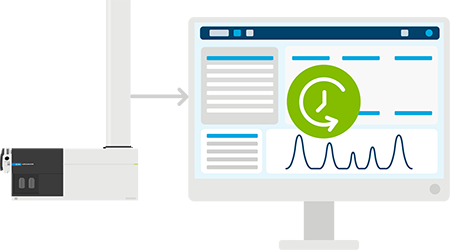
Direct instrument control and acquisition for Agilent LC/TOF and LC/Q‑TOF instruments adds LC/HRMS support alongside your existing LC and LC/MS workflows. This gives analysts a single, familiar software environment—reducing training time by delivering greater consistency across the lab.
Streamlined data analysis
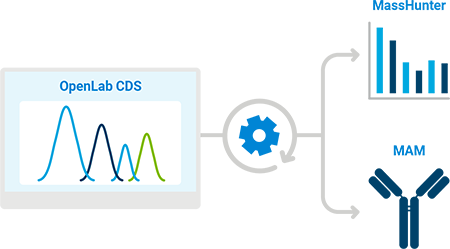
LC/HRMS data collected with OpenLab CDS can now be analyzed in MassHunter Qualitative Analysis and BioConfirm software—automatically without exporting files or converting formats. This seamless handoff makes data review faster, more consistent, and easier to manage across the QC team.

Support for emerging Multi-Attribute Method (MAM) workflows
Most MS data systems are built for R&D, making them inefficient for QC analysts to use due to the volume and complexity of spectral and chromatographic data. OpenLab CDS addresses this by providing easy-to-use, guided workflows that simplify data analysis for the QC user, removing bottlenecks, and improving turnaround time. MAM for OpenLab CDS offers a guided LC/HRMS workflow aligned with USP <1060>, leveraging the OpenLab compliance engine to ensure robust data integrity controls. Its intuitive design helps analysts approach new peak detection and extended analytics with confidence.
Learn more about the Agilent MAM solution
Simplify daily operations
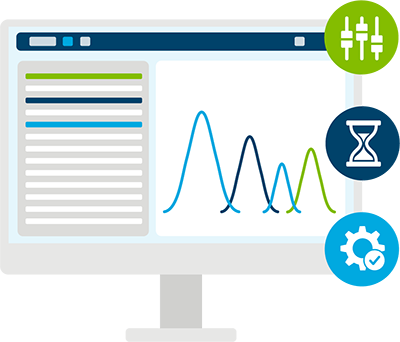
Save time by adding user defined tasks directly to your acquisition sequence. Specify when and how TOF and Q‑TOF autotune and mass calibration should run and automate end of day instrument shutdown. The Eco Standby mode further reduces nitrogen consumption during idle periods, supporting efficient and sustainable operation.
Enhance confidence in your GC/MS results
Clearer review, less manual effort, and easier management of complex data.

Improved qualifier ion workflows
Qualifier ion setup and review can be time‑consuming, especially when method adjustments unexpectedly affect results. OpenLab CDS now highlights when those changes have an impact, by automatically adjusting retention times, and reprocessing data as needed. Added flexibility in qualifier ion‑ratio calculations—and the ability to automatically populate qualifier ion ratios in the compound table—helps streamline review and support clearer, more reliable and accurate results in SQ GC/MS analyses.

Compound management made easier
Managing long compound lists—such as positional isomers —can make it difficult to navigate their associated signals and settings. Now you can group compounds and apply different integration parameters to each compound as needed. Whether you’re dealing with poorly resolved isomers or compound classes that require individualized handling, these enhancements help keep your analysis organized, flexible, and easier to manage.
A CDS that grows with your operations

Ready to upgrade?
Bring LC/HRMS into your CDS environment with OpenLab CDS version 3.0.
Contact us today to plan your upgrade.
Did you know?
Whether you're new to OpenLab CDS or an experienced user, you may not be familiar with all the features the software has to offer. Here are some OpenLab CDS tips and tricks all users should know.

Method approvals
Did you know that you can control access to the methods that your lab uses? Use the method status to ensure that only approved methods can be used to acquire and process data. With three distinct states, you can control which methods can be used within the lab.

Copy/paste
Did you know you can leverage data from spreadsheets to efficiently create or update sequences in OpenLab CDS? Simply use the "Copy from" or "Insert from Clipboard" feature. This is just one example of using the copy/paste functionality in OpenLab CDS.

Drag and drop
Did you know you can transform your basic sample lists into submission-ready sequences? From the sequence tab, simply drag and drop your sample list information file into the sequence window to create a sequence.

Create a custom layout
Did you know you can customize your workspace to suit your needs? Simply select a predefined layout, modify as appropriate, and your layout will be automatically saved. Or, create a new layout to expand your options.
Explore OpenLab CDS version history
See highlights from the last three releases below, or explore more detail in the
OpenLab CDS version comparison chart and release notes.
- Support for InfinityLab Pro iQ series including Mass-Based Fraction Collection (requires OpenLab CDS v2.8 Feature Pack 2)
- Support for UV Library Search (requires OpenLab CDS v2.8 Feature Pack 2)
- Support for Infinity III LC Series Technology (requires OpenLab CDS v2.8 Feature Pack 1)
- Enhanced Calibration and Quantification
- Data Integrity Enhancements
- Support for Biopharma Workflows
- Comprehensive Migration from Legacy Systems
- Calibration curve improvements
- Integration optimizer enhancements
- Centralized unattended printing
- Cloud-based help & learning
- Integration Optimizer
- Improvements in Mass Detection Analysis
- Dual Simultaneous Injection improvements
- Cloud deployments for data storage and administrative components
- Fractionation for Support (sample to fraction workflows without mass spec triggers)
- Method Approval and Obsolescence States
- Single Sign-On