
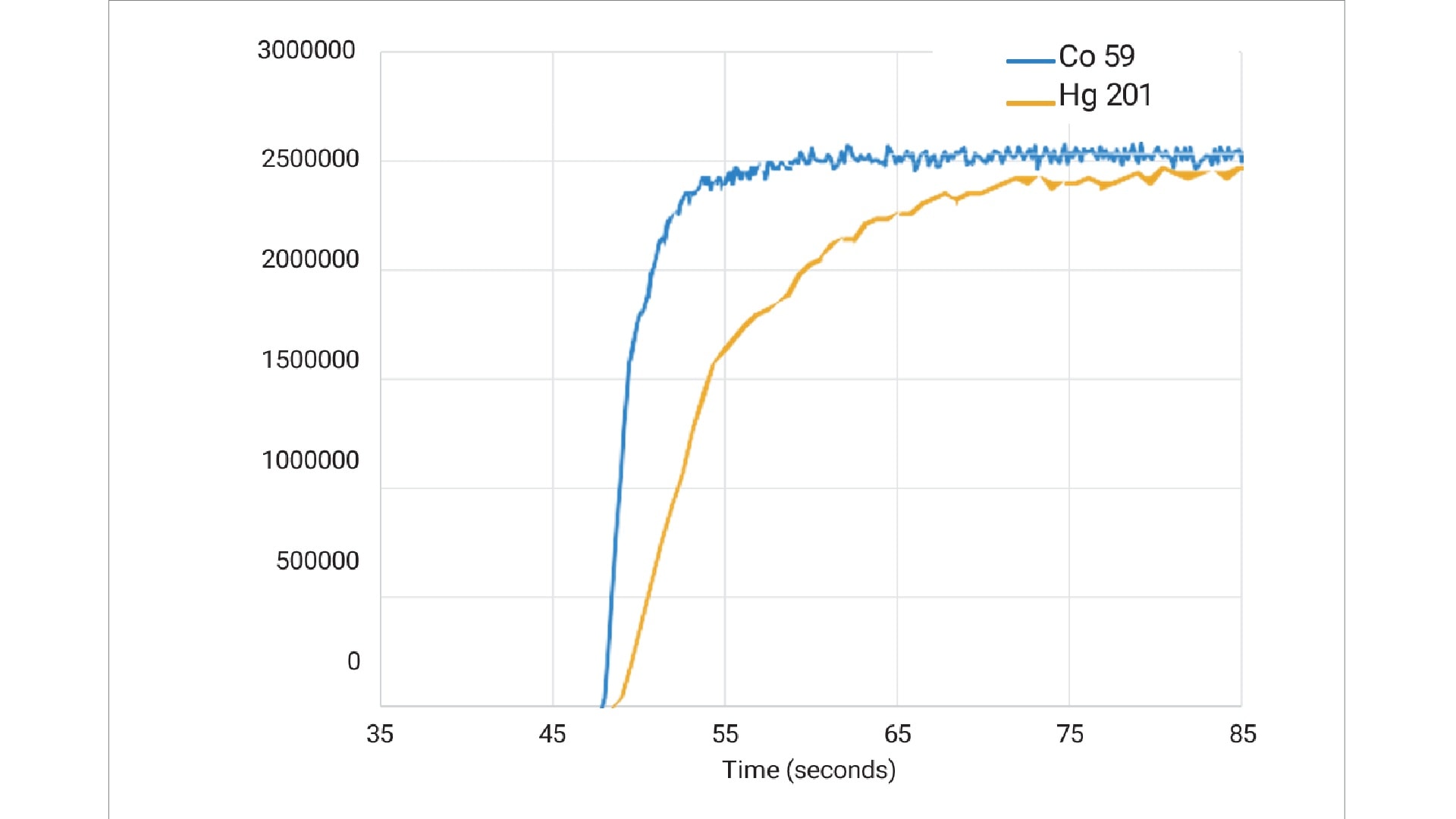
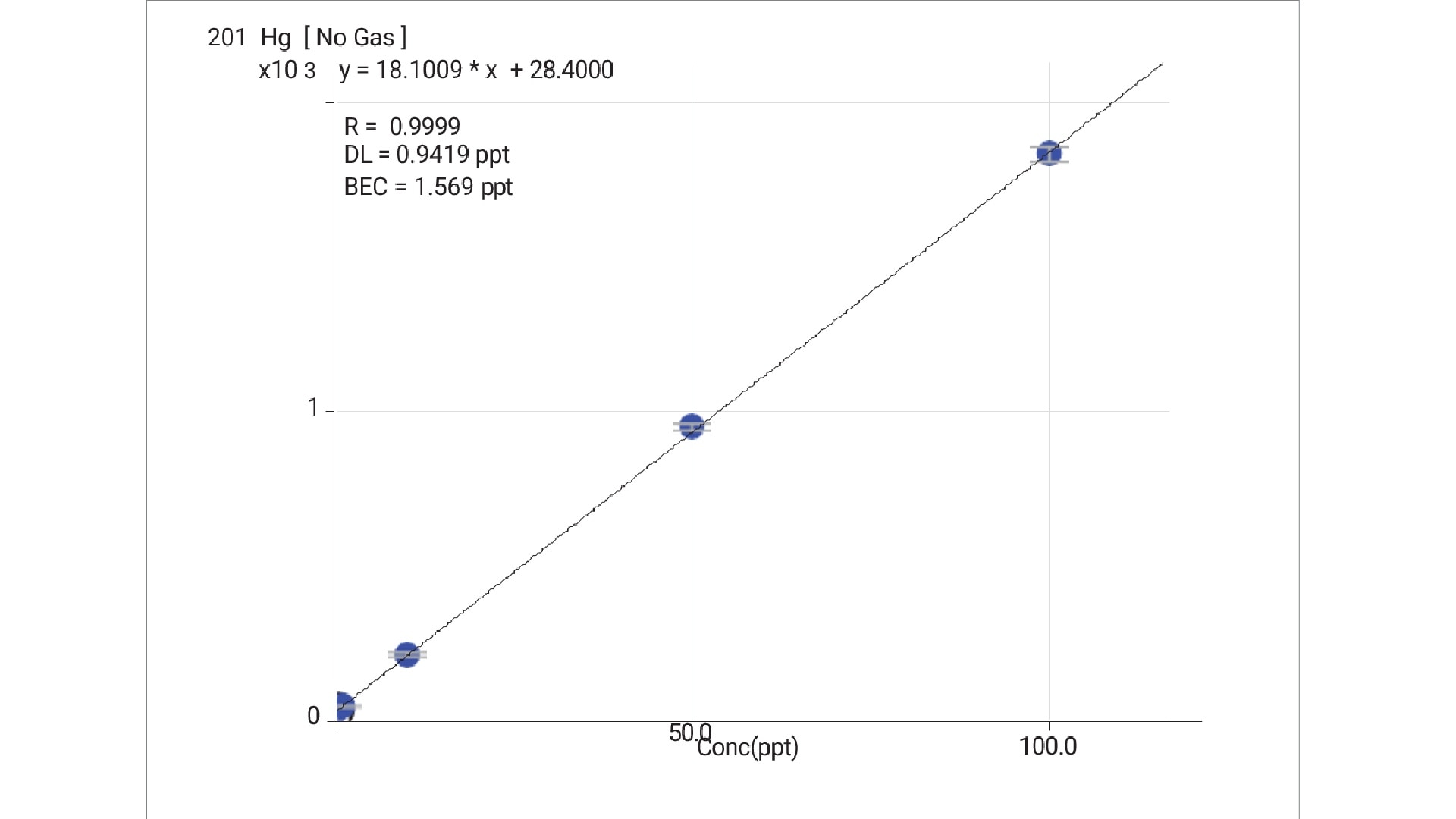
With He mode capable of resolving Cl interferences, ICP‑MS users now routinely add HCl and HNO3 for sample stabilization, addressing many long-standing issues, including Hg instability. HCl complexes Hg as [HgCl4]2-, ensuring that backgrounds are controlled, as shown in the ppt-level calibration in Figure 2. Hg is a critical element that can be measured at low levels using ICP‑MS, along with other regulated analytes. The multi-element measurement capability of ICP‑MS has enabled labs to simplify and streamline their routine analytical workflow, for example, by removing the need for a separate, single-element technique for Hg.
Adding HCl at a concentration of around 0.5% to all solutions (samples, calibration blanks and standards, QCs, etc.) ensures that the most common elemental stability issues are resolved. Recoveries improve, calibration linearity becomes more reliable, and sample throughput increases because wash-in and washout times are shorter.
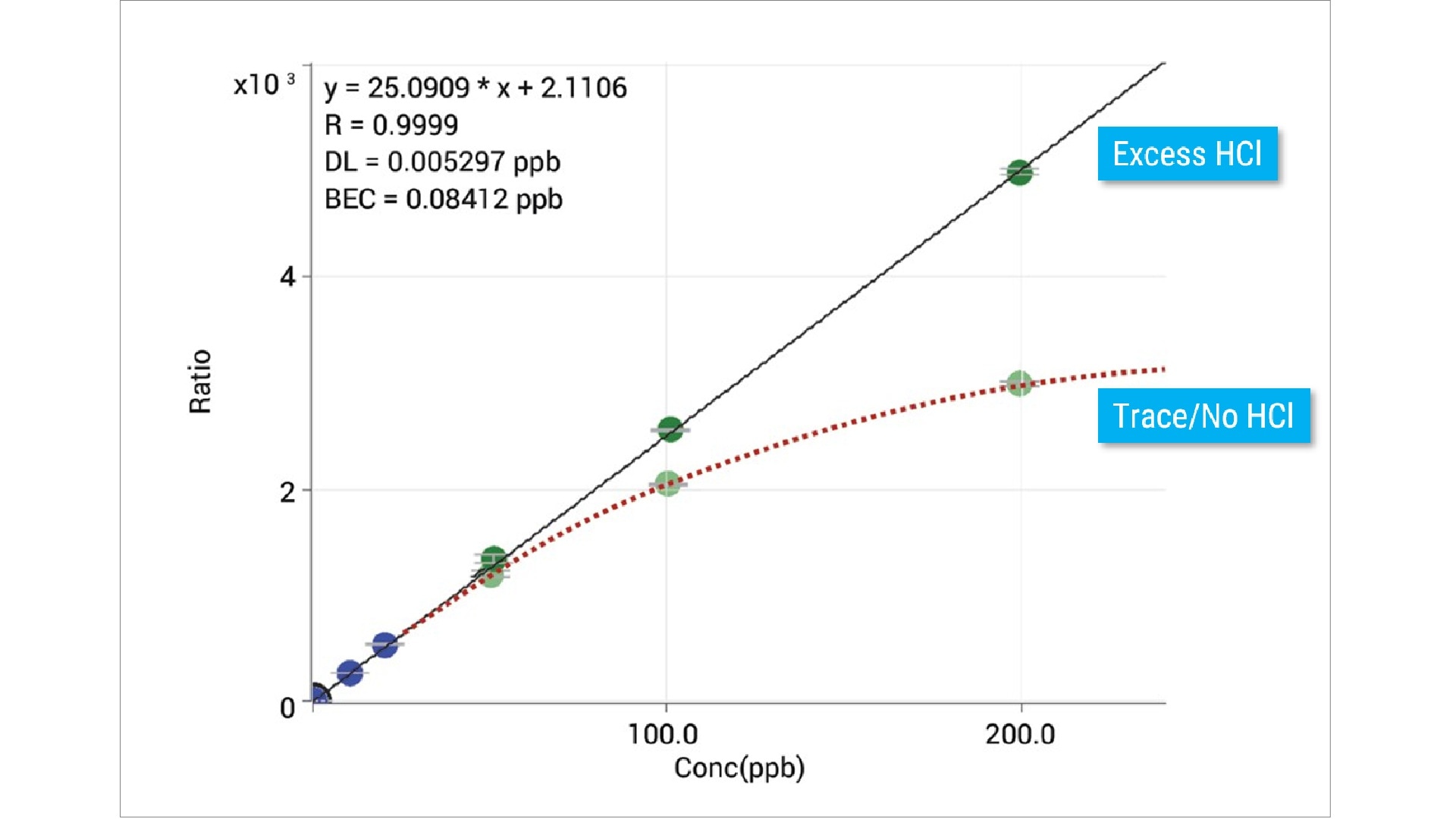
It is often assumed that adding HCl to sample solutions will cause chemical instability for some analytes; Ag is often cited as a chloride-incompatible element. While it is true that trace Cl- causes Ag to precipitate as insoluble AgCl, an excess of Cl- promotes the formation of soluble anionic complexes with the general formula AgCln(n-1)-.
An HCl concentration of 0.5% (in addition to 1–2% HNO3) is sufficient to stabilize Ag at concentrations of several µg/L (ppb). However, the solubility of the complexes depends on the relative amount of Ag+ and Cl-, so a higher HCl concentration is required for higher Ag concentrations. The effect of insufficient HCl on the stability of the higher-concentration Ag standards is evident in the non-linear calibration curve shown in Figure 3.
Optimizing the rinse
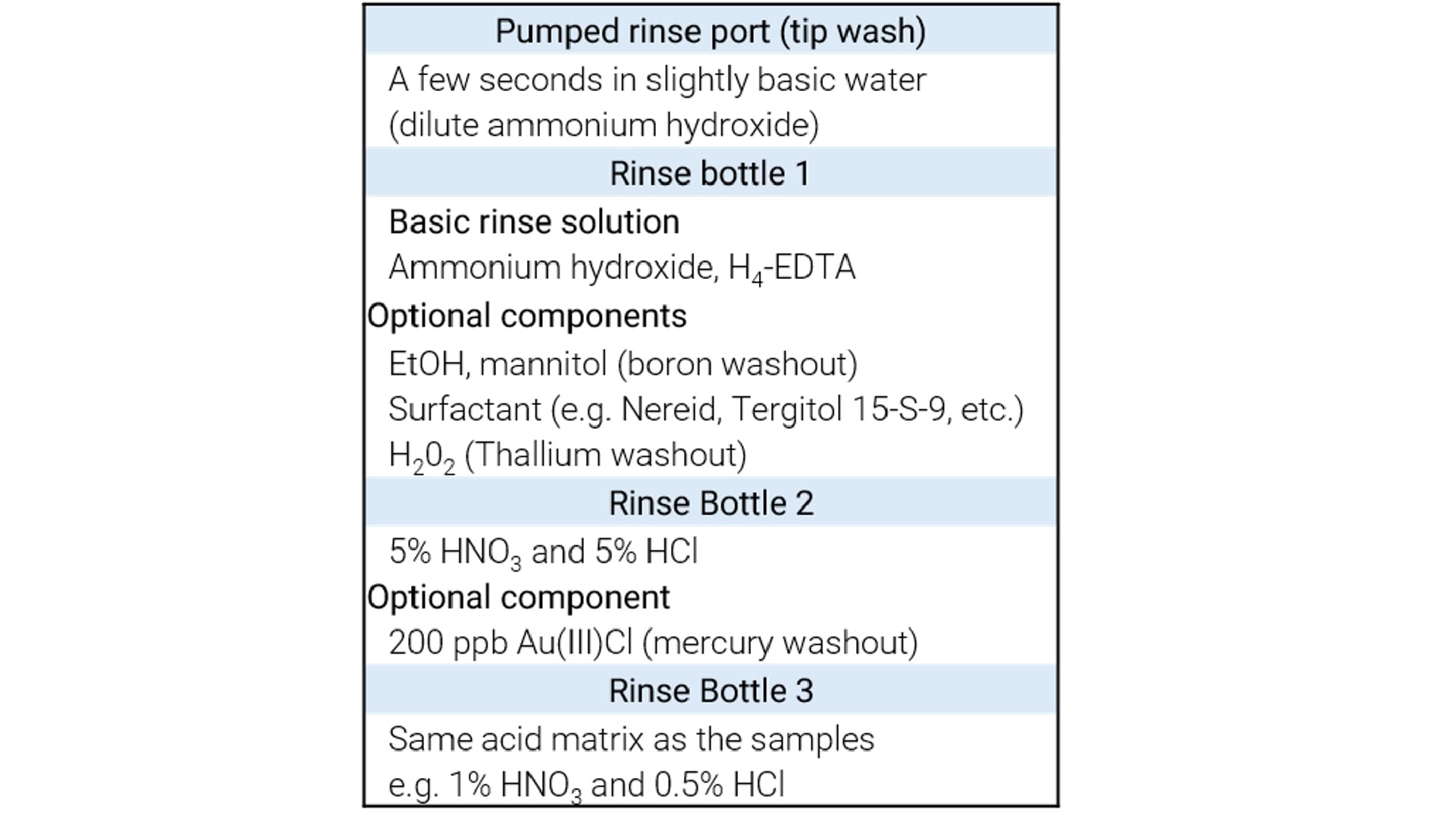
Chemical solubility is also an important consideration when optimizing the flushing or rinsing process between samples. Users who are new to ICP‑MS often assume that a simple rinse with deionized water or dilute HNO3 is sufficient to prevent carryover of signals from one sample to the next. However, some “sticky” elements can adsorb onto the inner surfaces of the tubing and sample introduction system, leading to elevated background and signal instability. Using a mixed-chemistry procedure can dramatically improve washout and reduce metal adsorption by “conditioning” the polymer surface. Table 1 details a recommended rinse procedure with reagents.
Basic rinse solution
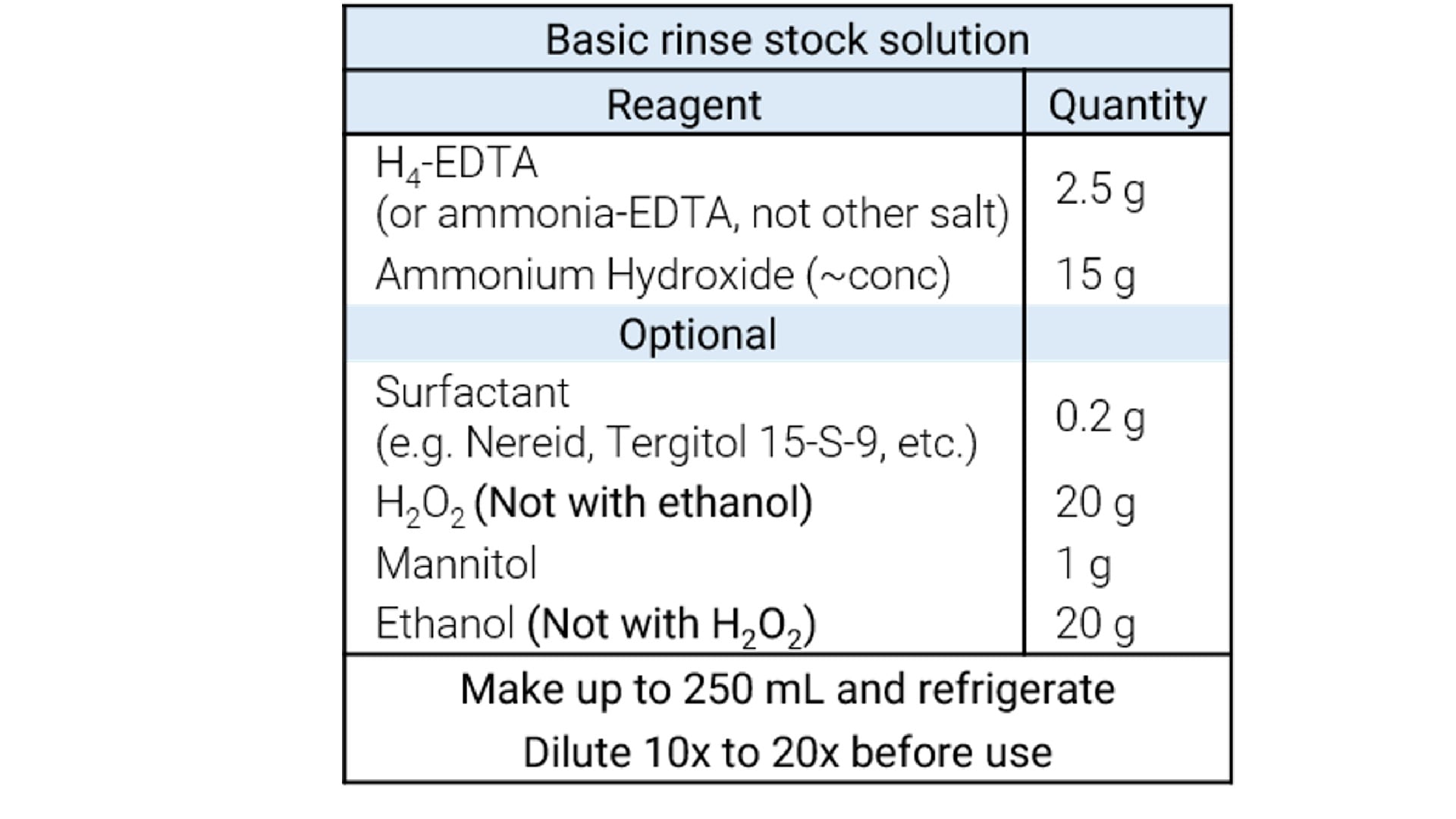
Table 2 lists the reagents for preparing a stock solution of the high-pH rinse solution, which can be diluted 10 or 20x to produce the final basic rinse. Please note that EDTA should be H4-EDTA or ammonia-EDTA salt rather than other forms (which often contain Na, Ca, or other ions).
A multistep rinse program is shown in Figure 4. The program uses alternating acidic and basic rinse solutions, which dramatically improve the washout of many elements. The “tip wash” in the pumped rinse station removes any sample solution that may remain on the outside of the autosampler probe.
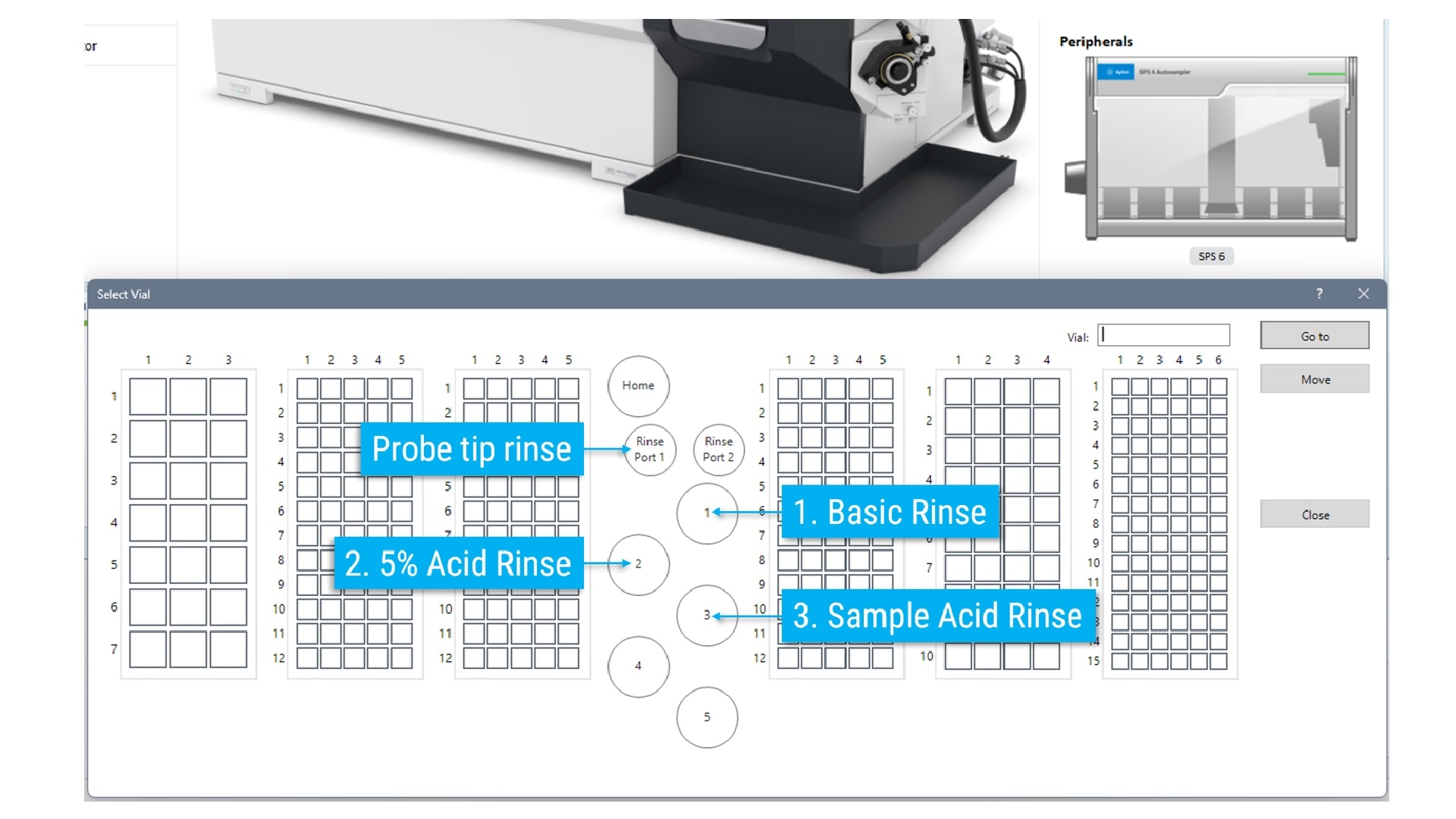
The tip wash step prevents contamination of subsequent rinse solutions. The addition of ethanol and/or mannitol (for boron), Au(III)Cl (for mercury), and H2O2 (for thallium) to the basic wash solution can further improve the removal of these specific analytes. Do not mix ethanol and H2O2; mannitol only will be sufficient for boron washout and will avoid chemical interactions.
The final rinse step listed in Table 1 reconditions the sample introduction system to the same acid mix as the samples, ensuring rapid equilibration when the next sample is introduced.
Preemptive Rinse program
The Preemptive Rinse function in Agilent OpenLab ICP‑MS and ICP‑MS MassHunter can further improve washout and speed. The function begins filling the dead volume between the autosampler and the nebulizer pump with clean rinse solution before the analysis ends. This does not require any additional hardware. Figure 5 shows a typical preemptive rinse program, using the multiple rinse steps outlined in this article.
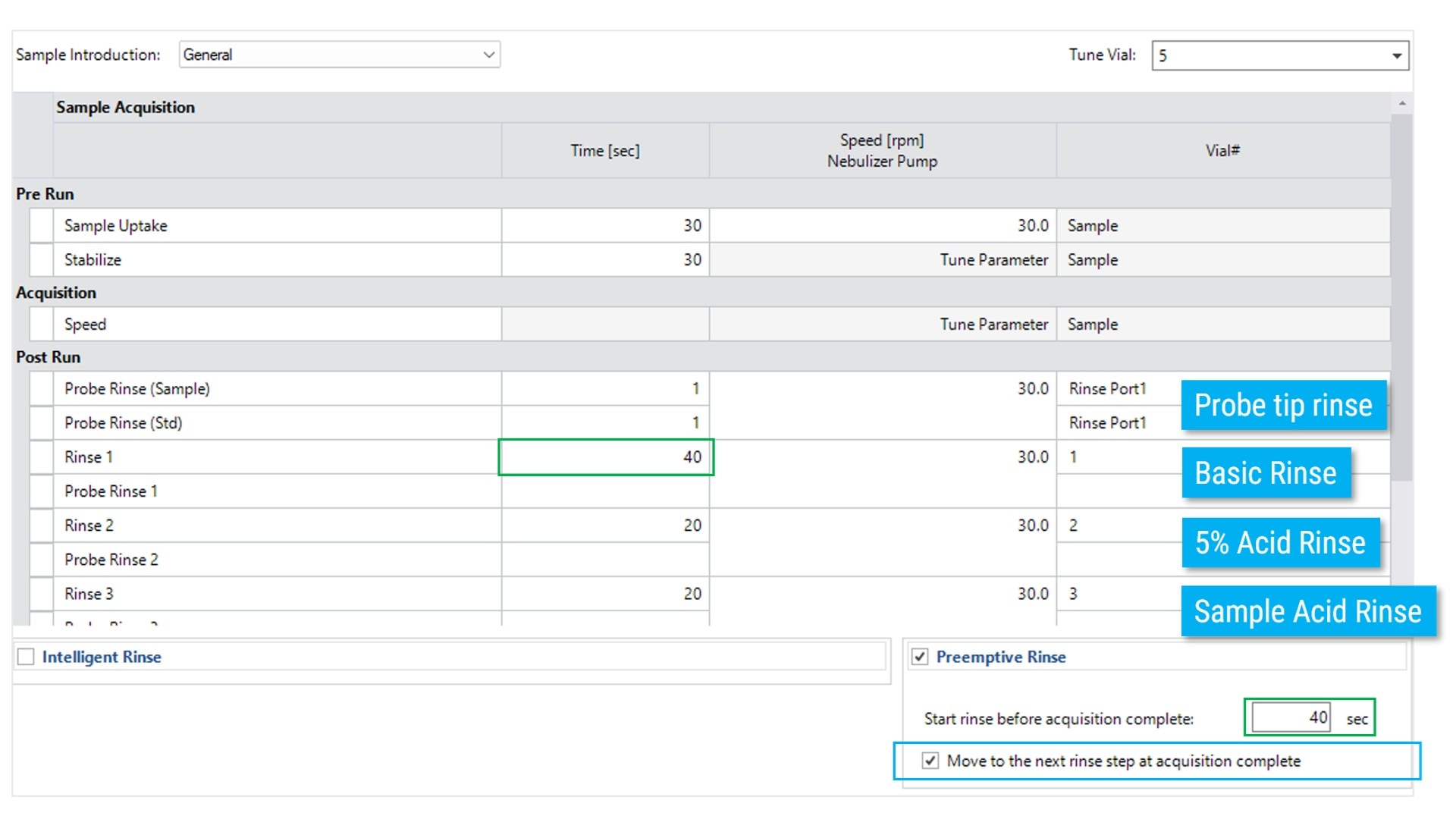
Although 40 seconds is typical for the default sample introduction configuration, it is advised to check the timing, particularly if the probe length has been altered or a different tubing diameter is used. To check the timing, run a blank batch (use water or a dilute acid as the sample – no calibration is needed). During sample measurement, when the probe moves to the first rinse, start a timer (you’ll need a stopwatch). Carefully watch the first bubble as it passes up the tubing. When it reaches the peristaltic pump tubing, stop the timer – this is the preemptive rinse time; enter it into the software.
Make sure the time for rinse position 1 is at least as long as the preemptive rinse time. The function will ignore the pump speed during the preemptive rinse period (this is because the sample is still being analyzed). When the analysis has finished, any remaining time in the rinse must be completed. There is an option to skip this extra time by selecting the Move to next rinse step at acquisition complete. If this option is selected, the program will then move directly to the next rinse step and increase the pumping speed.
Once set up, there is no need to retest the timings unless the sample or peristaltic tubing lengths or inner diameter are changed.
Reference
1. McCurdy, E., and Woods, G., J. Anal. Atom. Spectrom., 2004, 19, 607–615