Fragment Analyzer Software
Accelerate Nucleic Acid Quality Assessment with Confidence
- Fragment Analyzer controller software enables efficient data acquisition from the 5200, 5300, and 5400 Fragment Analyzer systems, supporting workflows from low to ultra-high throughput. With preloaded methods, it ensures consistent electrokinetic injections and precise voltage-based separations of nucleic acids.
- ProSize data analysis software provides fast and visual analysis of DNA and RNA molecules for size, concentration, and quality. It provides objective DNA and RNA quality metrics, making downstream applications more efficient. Compatible with genomic DNA, NGS libraries, plasmids, PCR amplicons, restriction digests, IVT mRNA, small RNA, and total RNA.
- Reliable data – Analyzes both the size and concentration of individual samples, including small and large smears, ensuring detailed sample information.
- Objective sample quality assessment – Provides objective sample quality metrics, such as GQN, RQN, and DV200, with customizable thresholds for GQN to assess degraded samples.
- Flexible report formats – Enables data and image export in multiple formats (CSV file, PDF, or a project report) for comprehensive analysis.
- Customizable settings – Allows to adjust electrokinetic injection conditions, including both voltage and time, to achieve superior separation.
- Easy data comparison – Allows for direct comparison of sample size, peak height, and separation profiles by easily overlaying samples from the same run or different files.
- Seamless integration – One data analysis software for the Agilent 5200, 5300, and 5400 Fragment Analyzer systems.
- Efficient data management – Features Laboratory Information Management System (LIMS), streamlining data management in laboratory environments.
- Reliable operation – Generates event error logs automatically, offering operational transparency and easier troubleshooting.
- Unlimited usage – Enables multiple users to use and evaluate samples across laboratories as a freely available software.
Overview
How it works
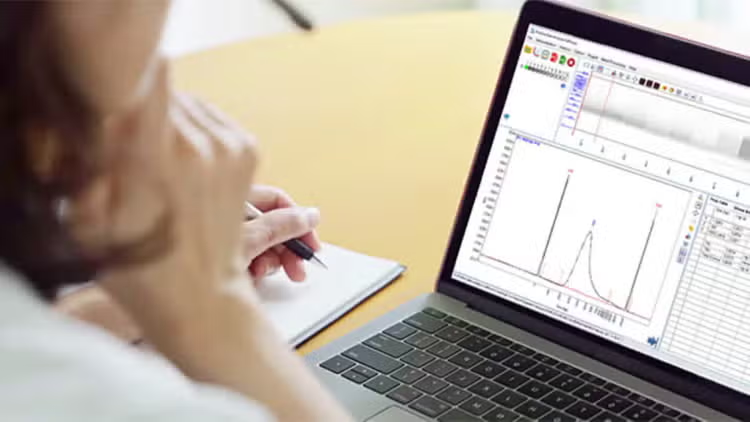
How-to videos for ProSize data analysis software
ProSize software delivers precise measurement of DNA and RNA sample size, concentration, and quality scores. Want to unlock its full potential? Explore our how-to videos for step-by-step guides to the powerful features.
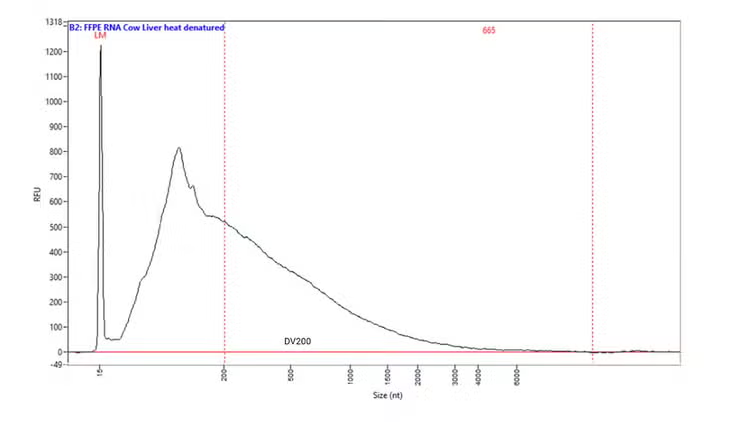
DV200 analysis with the Fragment Analyzer systems
Unlock the power of FFPE RNA with Agilent automated electrophoresis systems. Using the DV200 quality metric, you can quickly assess RNA integrity, identify samples fit for NGS, and optimize workflows to save time and cost. Adjust protocols with confidence—even for degraded samples—and achieve reliable results. Simplify RNA QC with DV200 on Fragment Analyzer systems for smarter, faster decisions.
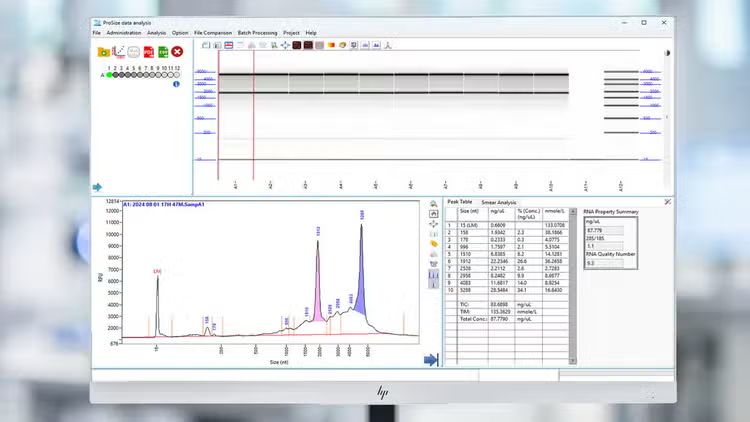
Nucleic acid integrity analysis by using Agilent quality metrics
Agilent automated electrophoresis systems deliver objective QC metrics to ensure sample integrity and sequencing confidence. From routine DNA and RNA to complex types like genomic DNA, cell-free DNA, and FFPE RNA, these systems provide reliable quality scores for streamlined NGS workflows. Take control of sample quality management and discover which metric best fits your need.
Specifications
Documents & support
Features
Interpret data and deliver results like a Pro
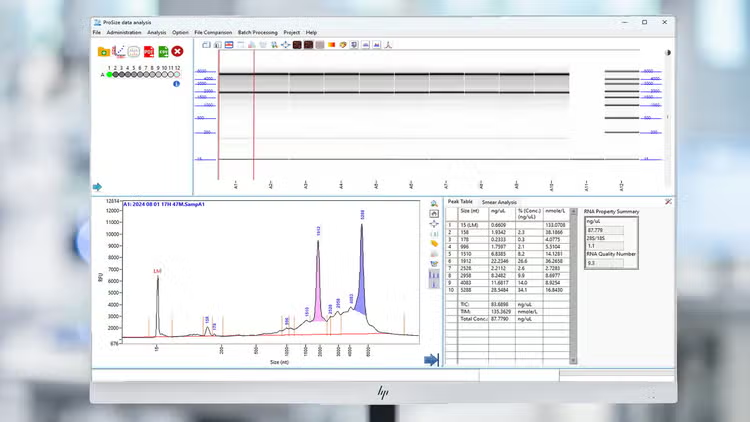
ProSize data analysis software
Evaluate DNA and RNA size, concentration, purity, and integrity in multiple formats, including gel images, electropherograms, and result tables.
Effortless visual data analysis
Inspect individual samples in detailed electropherogram view
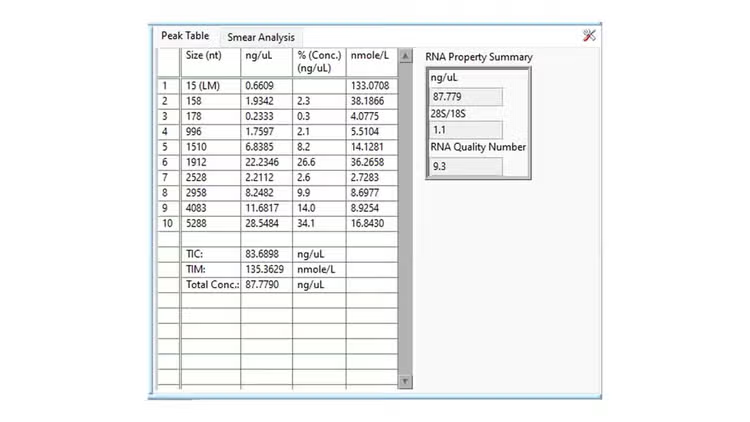
Concise data representation
Assess sample results with information about size and concentration in clear table format
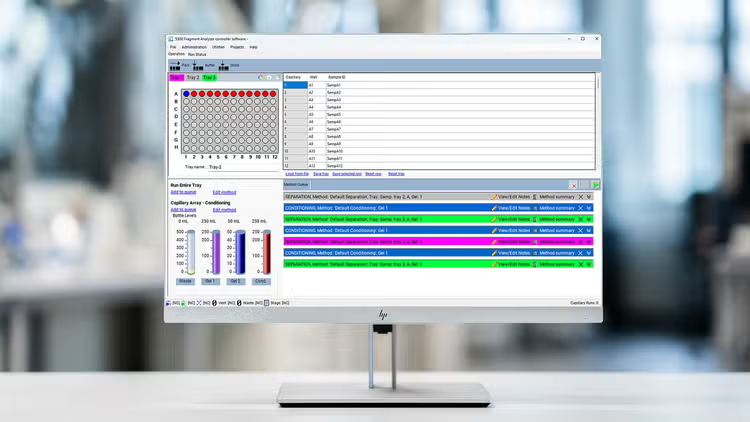
Fragment Analyzer controller software
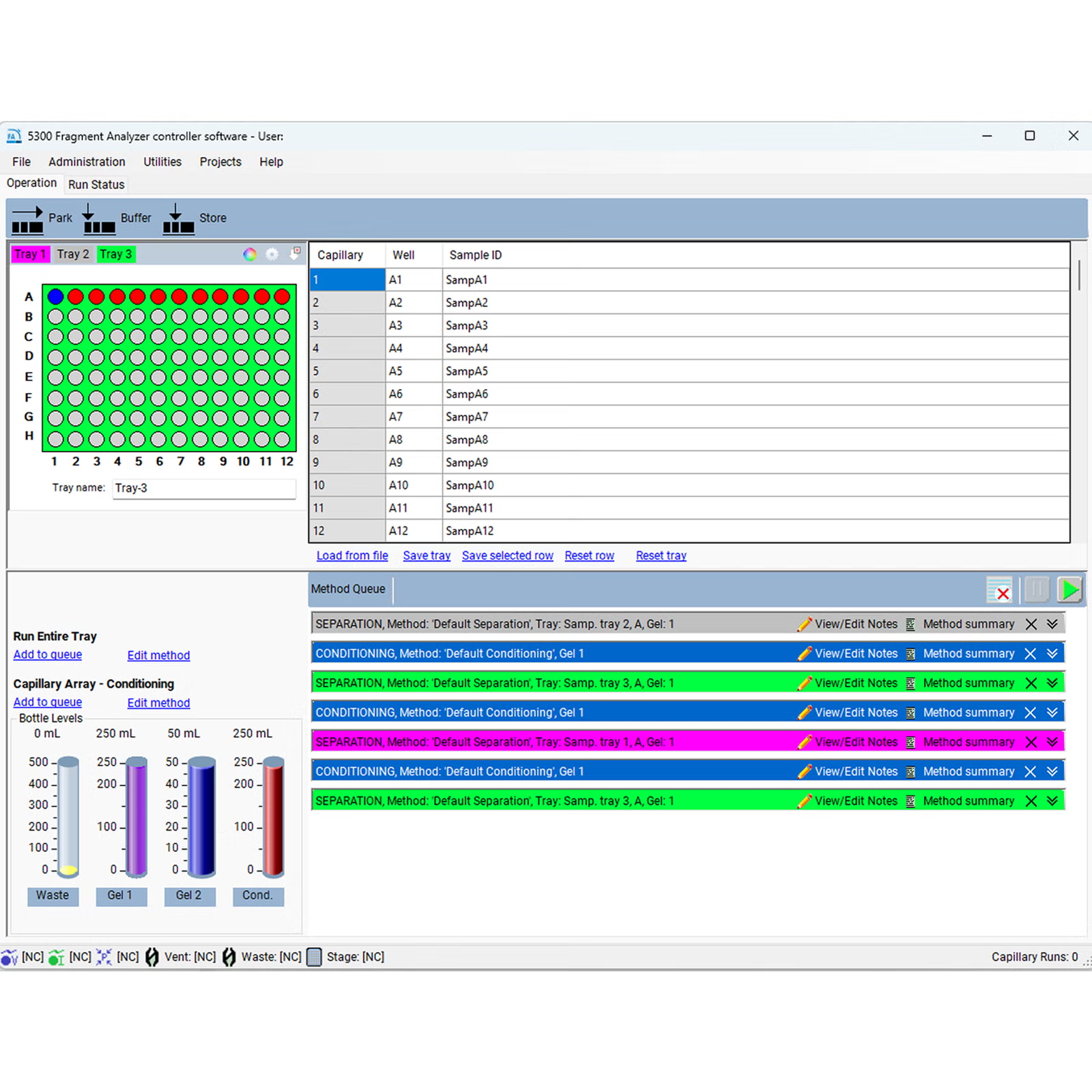
Offers flexible scalability for low-, mid-, and high-throughput workflows for data acquisition for the 5200, 5300, and 5400 Fragment Analyzer systems
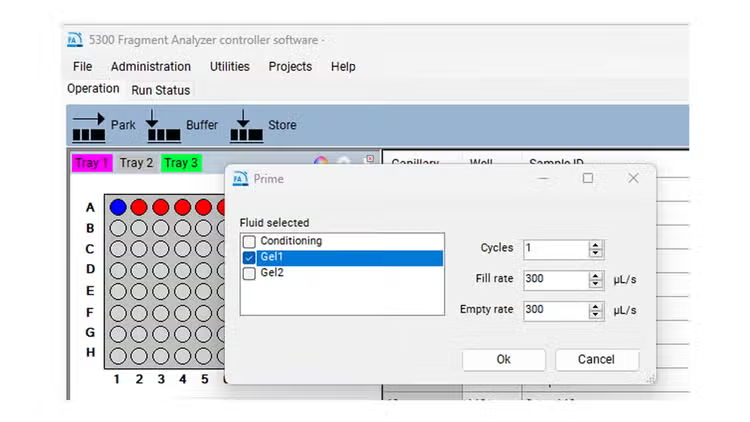
Versatile DNA and RNA workflows
Easily switch between DNA and RNA workflow applications
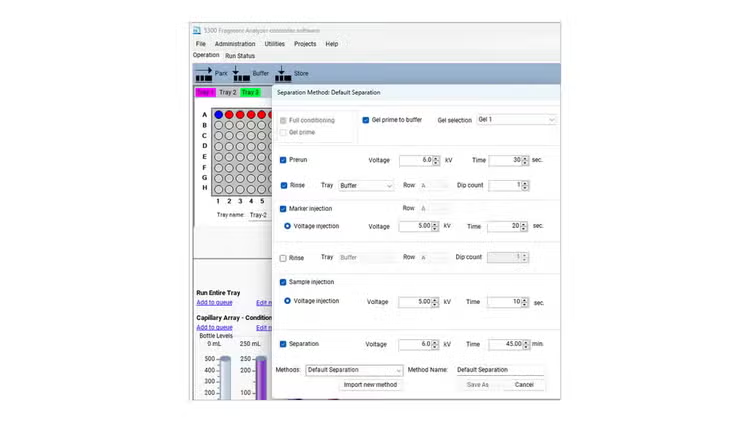
Optimal sample insights
Optimize electrokinetic injection conditions, including voltage and injection time, to achieve superior separation.
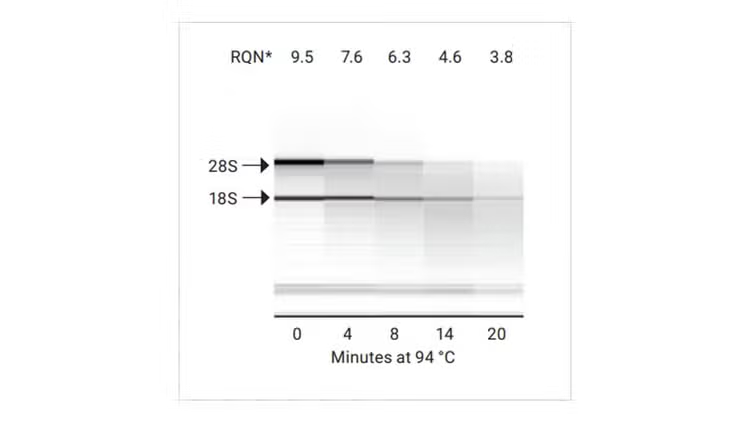
RNA quality number (RQN)
RQN provides a simple 1–10 scale for RNA integrity, making quality assessment fast and intuitive.
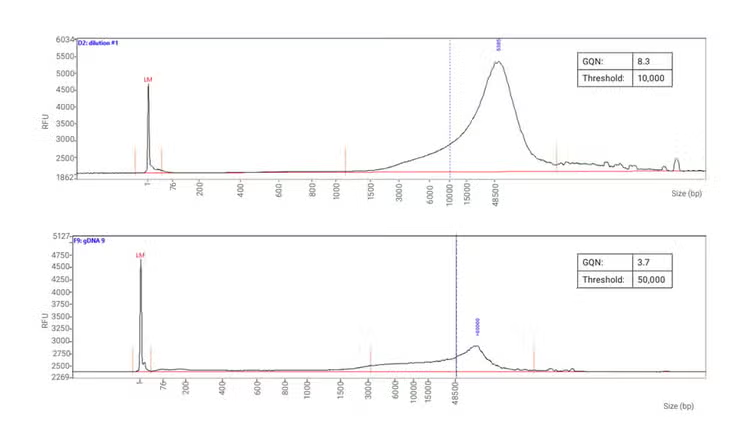
Genomic quality number (GQN)
GQN measures gDNA integrity on a 0–10 scale, based on DNA above your size threshold, providing quick and reliable quality metrics for confident workflows.
FFPE RNA distribution value (DV200)
DV200 represents the % of RNA fragments above 200 nt, ensuring reliable FFPE sample preparation for downstream applications.
Fragment Analyzer software system
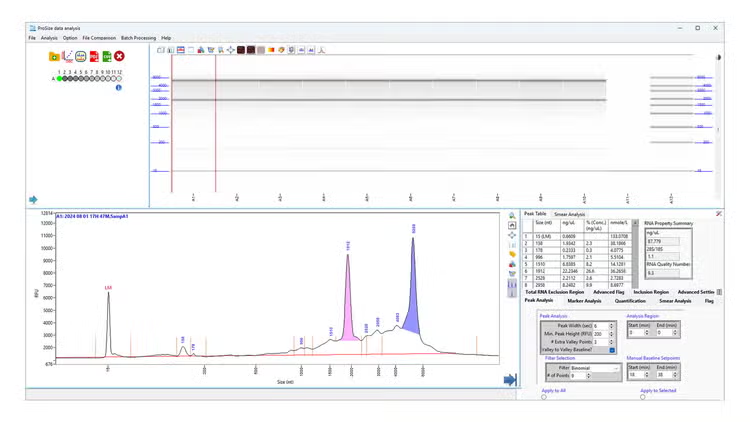
Simplify your sample quality analysis with automated electrophoresis instrument. Click each hotspot to learn more about the features on the Fragment Analyzer software suite. Use the button to navigate between the two screens.
-
File comparison
Allows create a file comparison by selecting different data files
-
Ladder use flexibility
Users can change well ladder, import or export electronic ladder for convenience use
-
Data reporting and exporting
Export measurement data to different formats like CSV and PDF or create data reports
-
Gel and electropherogram view
Results can be viewed in familiar gel view or electropherogram view
-
Result presentation
Automatically reports individual sample data
-
Versatility in sample analysis settings
Create a customized configuration by selecting the proper data analysis mode for DNA, RNA or more and analysis settings.
- 14%, 4%
- 8%, 17%
- 12%, 18%
- 16%, 35%
- 75%, 55%
- 97%, 75%
-
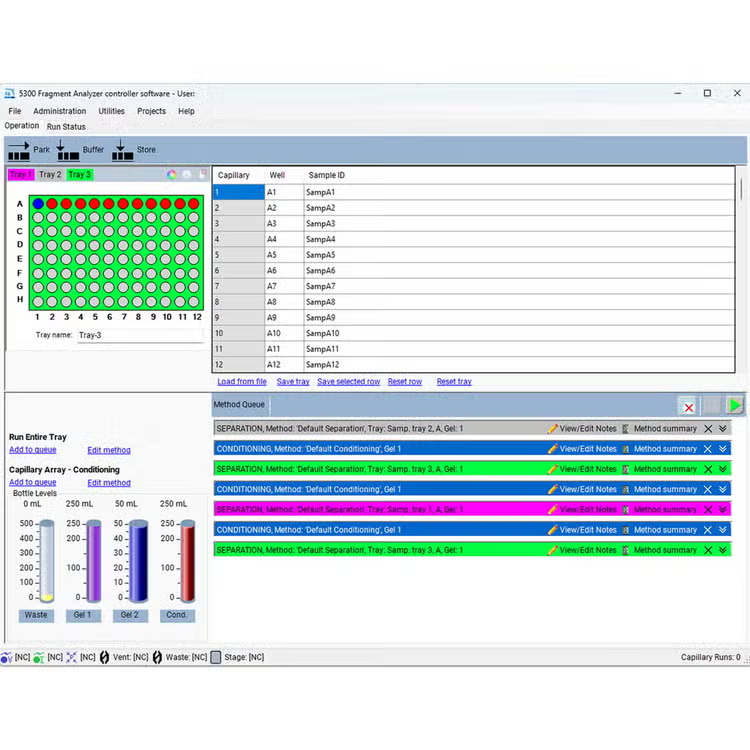
Easily choose tray and sample row
-
Streamlined sample description entry
Sample names can be entered by copy/paste or imported from a txt or .xls file
-
Intuitive method and sample queue view
Select one row or an entire tray for run data or conditioning method with color coordinated tray selection
-
Track solution levels
Monitors fluid levels to ensure sufficient supply for all scheduled instrument runs
- 0%, 23%
- 39%, 30%
- 0%, 60%
- 0%, 70%
Used across applications and industries
DV200 analysis with the Fragment Analyzer systems
Quickly perform input quality control for your FFPE RNA samples
Nucleic acid integrity analysis by using Agilent quality metrics
Learn more about the automated DNA and RNA quality metrics available with ProSize data analysis software
Frequently asked questions
Does the Fragment Analyzer software require license keys to operate?
No, the Fragment Analyzer software does not require license keys. It is fully functional and ready to use without any activation key.
Is Installation Qualification and Operation Qualification (IQ/OQ) available?
Yes. You can order IQ/OQ for the Fragment Analyzer system including SW.
What throughput levels does the system support?
The system is scalable for low to ultra-high throughput workflows, making it suitable for both research laboratories and core facilities.
What injection method does it use?
It uses electrokinetic injection for precise, reproducible sample loading, and improved sensitivity.
Is the system compatible with automation platforms?
Yes, the Fragment Analyzer integrates seamlessly with robotic liquid handlers and LIMS systems for fully automated workflows.
Does ProSize provide objective quality metrics?
Absolutely. It generates standardized quality scores for DNA and RNA and DV200, helping ensure consistency across experiments.
Can I export data from ProSize?
Yes, ProSize allows easy export of results in multiple formats, such as CSV and PDF for reporting and downstream analysis.
What types of samples can be analyzed?
It supports a wide range of DNA and RNA samples, including NGS libraries, genomic DNA, PCR amplicons, plasmids, restriction digests, microsatellites, total RNA, small RNA, and IVT mRNA.
style
Explore other products related to this software
PRDT_365720
PRDT_365721
PRDT_365729
PRDT_1149185
PRDT_365701
PRDT_365702
PRDT_365703
PRDT_365704
PRDT_365705
PRDT_365734
PRDT_365732
PRDT_380781
PRDT_365720
PRDT_365721
PRDT_365729
PRDT_365701
PRDT_365702
PRDT_365703
PRDT_365704
PRDT_365705
PRDT_365734
PRDT_365732
Software support and resources

Get support from our technical experts driving lab performance and reliability
World-class team of experts dedicated to you. Hand selected from across the globe, each bringing a wealth of experience and expertise to help you solve your issue quickly and efficiently.

Agilent University
Customized training and support for your lab. Agilent University offers in-person or virtual training courses and webinars.
Status bulletin
Software Status Bulletin for Agilent ProSize Software.
Software service desk
Submit a ticket to our service desk or login to see the status of your ticket