OpenLab ICP-MS Software

The next generation of ICP-MS software
- Agilent OpenLab ICP-MS software is the next generation of ICP-MS MassHunter, bringing instrument control, method setup, acquisition, data review, reporting, and maintenance into one user-friendly environment for Agilent ICP-MS and ICP-QQQ systems. The dashboard, Instrument Hub, guided diagnostics, Early Maintenance Feedback, Meter Monitor, and clear status indicators help users manage daily operation with confidence.<br><br>Method Advisor and the Batch Conversion Tool simplify ICP-MS/MS method setup and transfer, while IntelliQuant and Star Rating help users review sample composition and data quality faster. Optional modules and integrated control extend workflows across chromatography, intelligent sequencing, single nanoparticle analysis, autosamplers, ADS 2, LC and GC systems, Smart Chiller, and Gas Clean Sensor support.
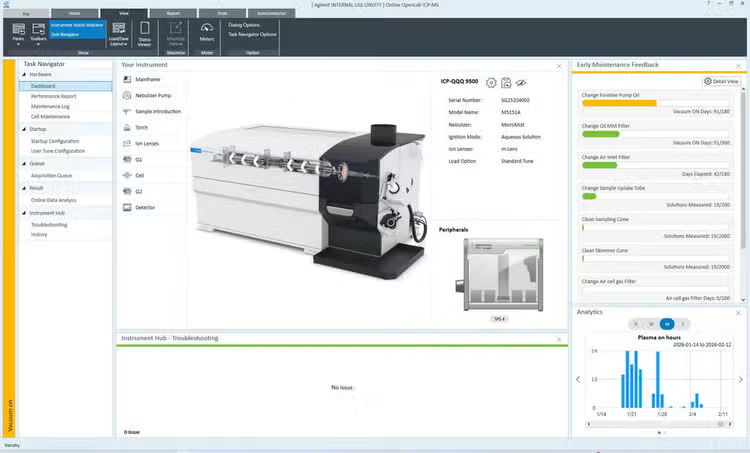
- Workflow-focused dashboard provides at-a-glance visibility of instrument status, system health, Early Maintenance Feedback, and troubleshooting access
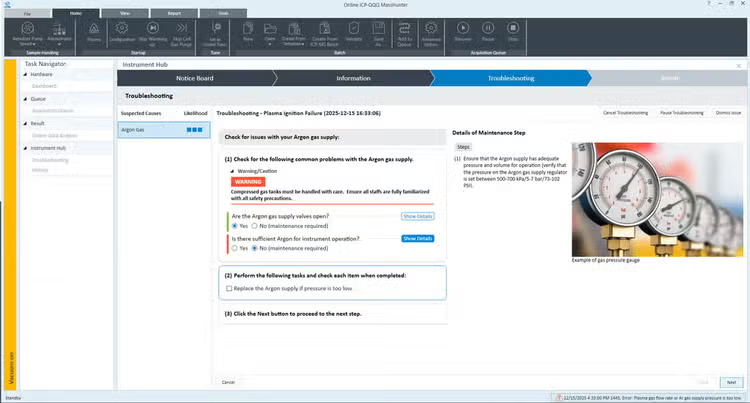
- Instrument Hub and guided diagnostics provide step-by-step support with images and videos to simplify troubleshooting
- Method Advisor simplifies ICP-MS/MS method creation by applying recommended conditions based on selected target elements
- Batch Conversion Tool helps convert Agilent single quadrupole ICP-MS methods for ICP-MS/MS workflows
- IntelliQuant captures a complete mass spectrum and displays semiquantitative results in a color-coded periodic table view
- IntelliQuant Star Rating assesses data quality for each quantitative isotope in every sample using a simple 0–5 star rating, helping users quickly identify results that may need review
- Integrated ADS 2 control supports autocalibration, prescriptive and reactive dilution, and smart dilution workflows
- Built-in technical controls help ensure data security, control access, and facilitate compliance as defined by US FDA 21 CFR Part 11, EU Annex 11, and similar national electronic record regulations
- Flexible data analysis and reporting tools simplify batch review, outlier filtering, QC assessment, and export to Excel, CSV, text, or LIMS
- Integrated control extends workflows across SPS 4 and SPS 6 autosamplers, compatible LC and GC systems, Smart Chiller, Gas Clean Sensor support, and optional workflow modules
Overview
See what's new in OpenLab ICP-MS version 1.1
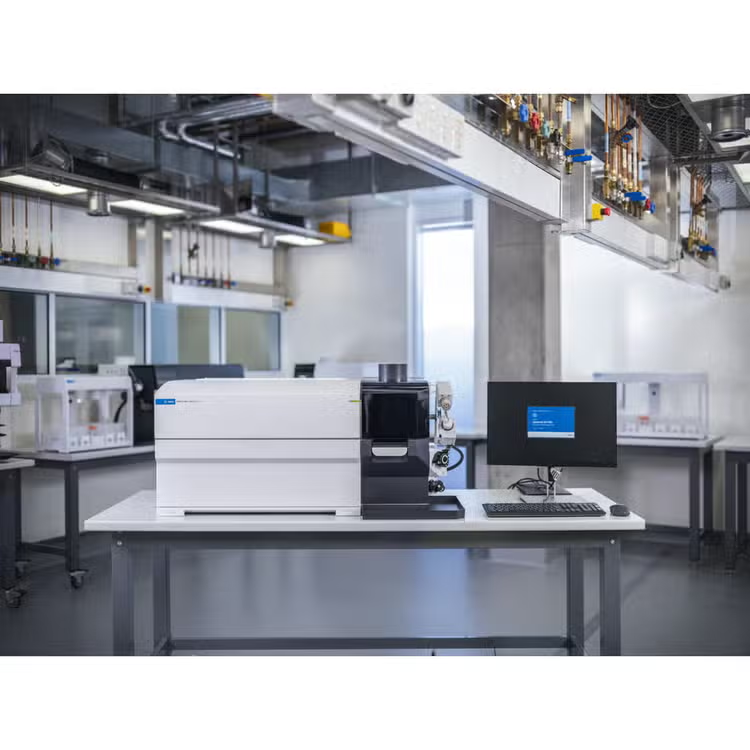
Support for the Agilent 9500 ICP‑MS
OpenLab ICP‑MS 1.1 fully supports the Agilent 9500 ICP‑QQQ, enabling single-quadrupole ICP‑MS users to access the power of triple-quadrupole ICP‑MS with a streamlined software experience.
The software is designed to simplify the use of advanced hardware technologies, providing intuitive control and optimized workflows, reducing the learning curve so your first run is right.
Redesigned dashboard for daily operation
Available for: All models supported by OpenLab ICP-MS 1.1, including Agilent 7800, 7850, and 7900 ICP-MS systems, and Agilent 8900 and 9500 ICP‑QQQ systems.
A newly designed dashboard provides a clear, workflow‑oriented overview of instrument status, maintenance, and system health.
- At‑a‑glance instrument status with color‑coded indicators
- Intuitive access to configuration, maintenance, and guided troubleshooting
- Early Maintenance Feedback (EMF) to reduce unplanned downtime
This redesigned interface helps users quickly assess instrument readiness, avoid unplanned downtime, and take action during routine operation.
Instrument Hub and guided diagnostics
Available for: All models supported by OpenLab ICP‑MS 1.1
OpenLab ICP‑MS introduces enhanced error management through the Instrument Hub and Diagnostics tools.
Highlights:
- Centralized health monitoring and diagnostics
- Guided troubleshooting with step‑by‑step support
- Automated analysis of system data during error events
For supported error scenarios such as plasma ignition failure, the system automatically logs and analyzes data, suggesting corrective actions.
Method Advisor for simplified ICP‑MS/MS workflows
Available for: Agilent 9500 ICP-MS
Method Advisor introduces an element‑centric workflow that simplifies method creation for ICP‑MS/MS analysis, especially for the 9500 ICP‑QQQ.
Users can build a method in three simple steps:
-
Select target elements, with three options:
- Manual selection
- From a predefined element list, for example, USP <232> and EPA 6020
- Import an element list from a CSV file
-
Enter calibration information and basic sample details
-
Automatically generate a complete method, including recommended cell gas modes, acquisition masses, and tuning conditions
Importing an element list from a CSV file enables seamless integration with alternative technologies and non-Agilent instruments.
With only minimal input, Method Advisor applies Agilent’s ICP‑MS/MS expertise to configure optimized measurement conditions.
Method Advisor simplifies method creation and lets users reuse existing element lists, helping them move from setup to measurement more efficiently and confidently.


Batch Conversion Tool for seamless migration
Available for: All models supported by OpenLab ICP‑MS 1.1
A newly designed dashboard provides a clear, workflow‑oriented overview of instrument status, maintenance, and system health.
- At‑a‑glance instrument status with color‑coded indicators
- Intuitive access to configuration, maintenance, and guided troubleshooting
- Early Maintenance Feedback (EMF) to reduce unplanned downtime
This redesigned interface helps users quickly assess instrument readiness, avoid unplanned downtime, and take action during routine operation.
Documents & support
Frequently asked questions
Is OpenLab ICP-MS Software replacing ICP-MS MassHunter?
Yes. OpenLab ICP‑MS software is the next generation of ICP‑MS MassHunter, bringing instrument control, method setup, acquisition, data review, reporting, and maintenance into a single environment.
How does Method Advisor simplify ICP-MS/MS method development?
Method Advisor applies recommended operating conditions based on selected target elements, helping users create ICP‑MS/MS methods more quickly and with less reliance on expert knowledge.
What is IntelliQuant and why is it useful?
IntelliQuant captures a complete mass spectrum and displays semiquantitative results in a color-coded periodic table view, helping users understand sample composition and identify unexpected elements.
How can I quickly assess data quality?
IntelliQuant Star Rating assigns a simple 0-5 star rating to each quantitative isotope for each sample, allowing users to quickly identify results that may require additional review.
Does OpenLab ICP-MS Software support regulated environments?
Yes. Built-in technical controls help support data security, controlled access, and compliance with regulations such as 21 CFR Part 11 and EU Annex 11.
Can OpenLab ICP-MS control automation hardware?
Yes. The software integrates with ADS 2 workflows and supports SPS autosamplers, Smart Chiller, Gas Clean Sensor, and other workflow components.
style
Explore other products related to this software
PRDT_913607
PRDT_3091924
PRDT_913605
PRDT_913604
PRDT_9854686
PRDT_913560
PRDT_913557
PRDT_1465853
PRDT_913537
PRDT_913542
PRDT_4470528
PRDT_913606
PRDT_913607
PRDT_3091924
PRDT_913605
PRDT_913604
PRDT_913606
PRDT_9854686
PRDT_913560
PRDT_913557
PRDT_1465853
PRDT_913537
PRDT_913542
Software support & resources

Get support from our technical experts driving lab performance and reliability
World-class team of experts dedicated to you. Hand-selected from across the globe, each bringing a wealth of experience and expertise to help you solve your issue quickly and efficiently.

Software download center
Manage and effectively operate your software licenses with SubscribeNet.
Software Support Lifecycle Policy
Check the lifecycle status for revisions of the Agilent atomic spectroscopy suite of software products
Online Help and Learning Center
The comprehensive and interactive ICP-MS software Help and Learning Center is now available online.
Contact support
Connect with your local Agilent team.